Media RGB Video Enhancement Playback
This sample shows how to get hold of recorded video and show each frame with some enhancement.
The recorded video can be selected from either a XProtect server, or directly from selecting a folder / file containing a XProtect database.
The sample has a picturebox showing the same video as it has been enhanced. 5 sliders are used to instruct the enhancement method of how to change the red, green and blue pixels for each frame.
The sample is written in C# and using a C++ DLL for doing the pixel modification. The C++ DLL is part of the sample.
The communication is using an IntPtr from the C++ DLL into a new C# Bitmap for displaying the enhanced frames.
MIP Environment - .NET Library
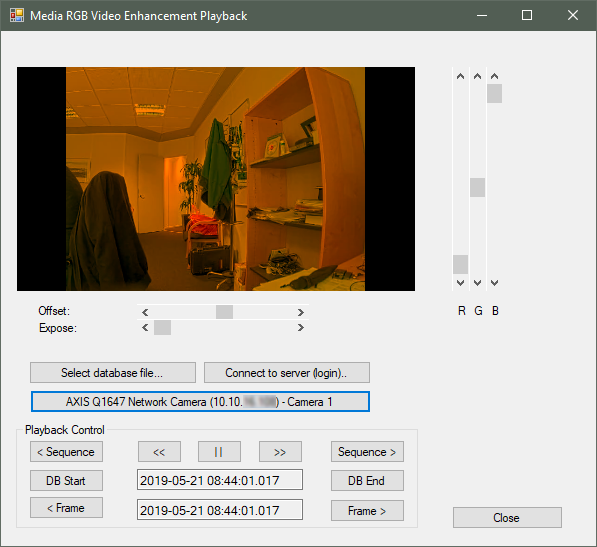
The video enhancement options are the same as for the RGB Video Enhancement plug-in sample in the Smart Client as well as the Media RGB Enhancement Playback.
This sample also has two buttons for selecting either a file or a camera to be supplying the frames.
When a source has been selected, control can be performed using the buttons at the bottom.
The playback is handled by the PlaybackController class.
The sample demonstrates
- Use of media source toolkit for accessing locally stored video databases
- Use of the PlaybackController when looking at a database
Using
- VideoOS.Platform.Data.BitmapVideoSource
- VideoOS.Platform.Messaging.MessageId.SmartClient.PlaybackCommand
Environment
- .NET library MIP Environment