Utilize ImageViewerWpfControl and PlaybackWpfUserControl
The ImageViewerClient sample demonstrates how to show playback and live video for a selected camera. The user will get a login dialog, once logged in a camera can be chosen using the ItemPickerForm.
Navigating the playback video is done using a PlaybackWpfUserControl, a control that to some degree resembles the time line and playback user control as known from the Smart Client. The user can digitally zoom and choose whether the images are scaled to the control in a way where aspect ratio of the images is maintained or not.
The user can experiment with playback control, whether to skip gaps in recorded footage or not or stop the playback when a gap is encountered.
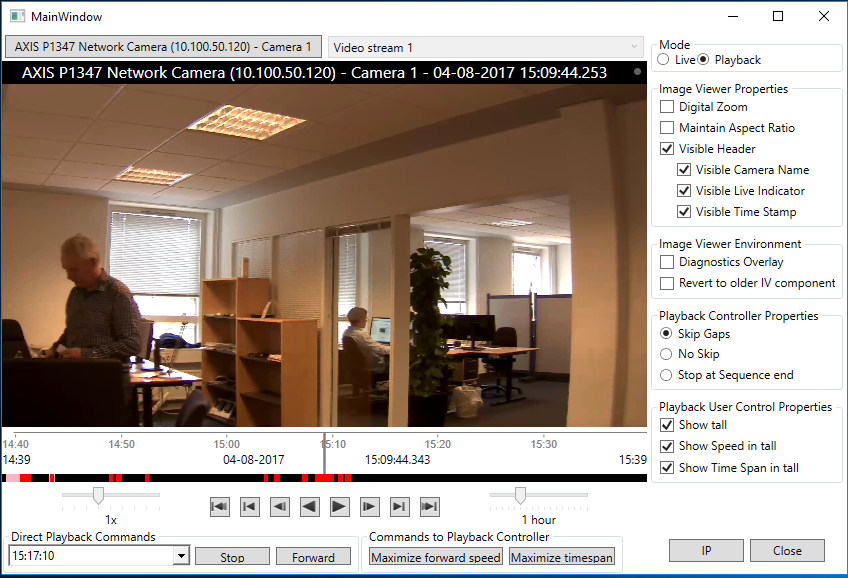
The sample demonstrates
- Connection and login
- Initialization of MIP .NET Library, when video display is required
- Video display playback and live
- Tall and short version mode of the PlaybackWpfUserControl can be chosen by user
- Will start with default live stream and switch between multiple live streams (if multiple live streams are configured for the camera)
- Demonstrates playback behavior when there are pauses in recorded footage. Three options can be chosen: Skip gaps, no skip or stop playback at sequence end
- Diagnostics overlay for video rendering can be enabled
- You can request the information on the IP address of the camera
- Working with exported files (called offline mode)
- Playing audio stream as well as video stream
Using
- VideoOS.Platform.Client.PlaybackWpfUserControl
- VideoOS.Platform.Client.ImageViewerWpfControl
- VideoOS.Platform.Messaging.MessageId.SmartClient.PlaybackCommand
- VideoOS.Platform.Messaging.MessageId.Server.GetIPAddressRequest
Environment
- MIP .NET Library (Component Integration)