Architecture
Class Life Cycle
During application start and stop, as well as when a user logs in and out, it is important to understand the order of method calls and messages.
In this section, we will explain the Init() and Close() methods that are present in many of the plug-ins and UserControls.
In general, the Init() method is called when the class is able to start doing something useful:
- On PluginDefinition that is when MIP Environment is ready for message registration
- On Plugin classes it is called when MIP Environment is ready and configuration ready
- On UserControls it is typically right after construction; here the Close() may be important to clean up resources
During application start, all MIP plug-ins are loaded into memory, and one PluginDefinition for each plug-in is constructed. The PluginDefinition will not be constructed at any later time during the same application execution.
During the loading of the plug-ins, the executing application and the MIP Environment are generally not operational, and can therefore not support any calls.
When all plug-ins are loaded, and the MIP Environment is up and running, the PluginDefinitions Init() method is called on all plug-ins. At this point, the plug-ins can register message receivers, and load local resources, but the main application may still not have logged in to any server.
Access to the plug-in property lists (for excample BackgroundPlugins, SidePanelPlugins, OptionDialogsPlugins) differs slightly from application to application. The following sequence should therefore be observed:
- During application start, the plug-ins are accessed
- When the configuration is ready for access, the plug-ins Init() method is called
- When a user logs out, or a service is stopping, the Close() method is called
- If a user logs in and out many times, the Init() and Close() will be called on the plug-in classes accordingly (the Init() on the PluginDefinition is only called once).
Construction of UserControls is usually done when needed, and not re-used later. The relevant GenerateUserControl() methods should therefore always create a new instance of the specific UserControl.
Class Life Cycle – Administrators
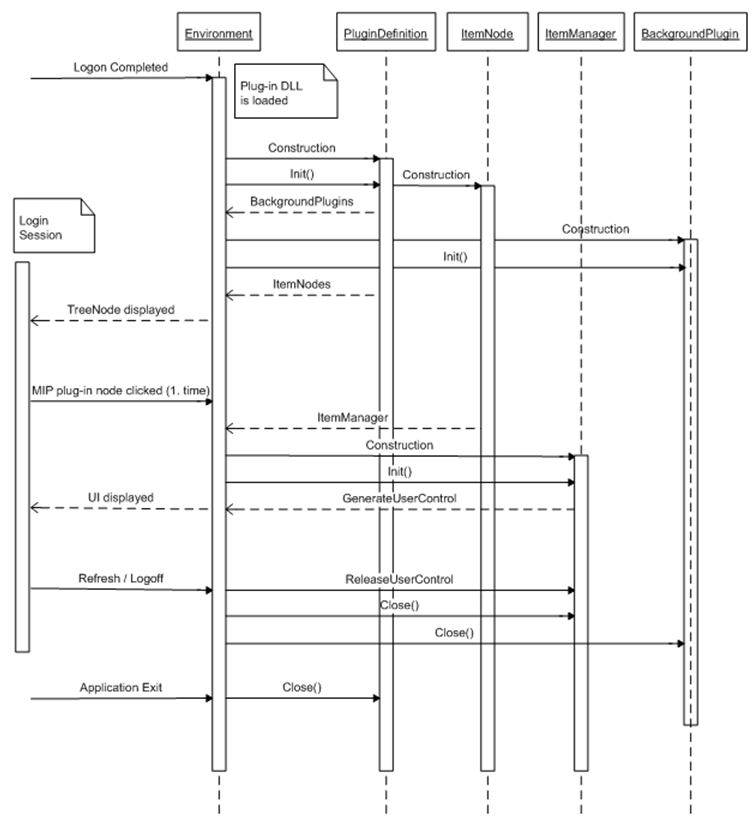
The life cycles of each of the main classes are illustrated below. The bar under each class name illustrates the period in which the class exists.
To start with, only the PluginDefinitions and the BackgroundPlugins are constructed and initialized. The ItemNode is expected to be constructed in the PluginManager's Init() call. The ItemManager is initialized the first time it is required.
Class life cycle – Smart Client
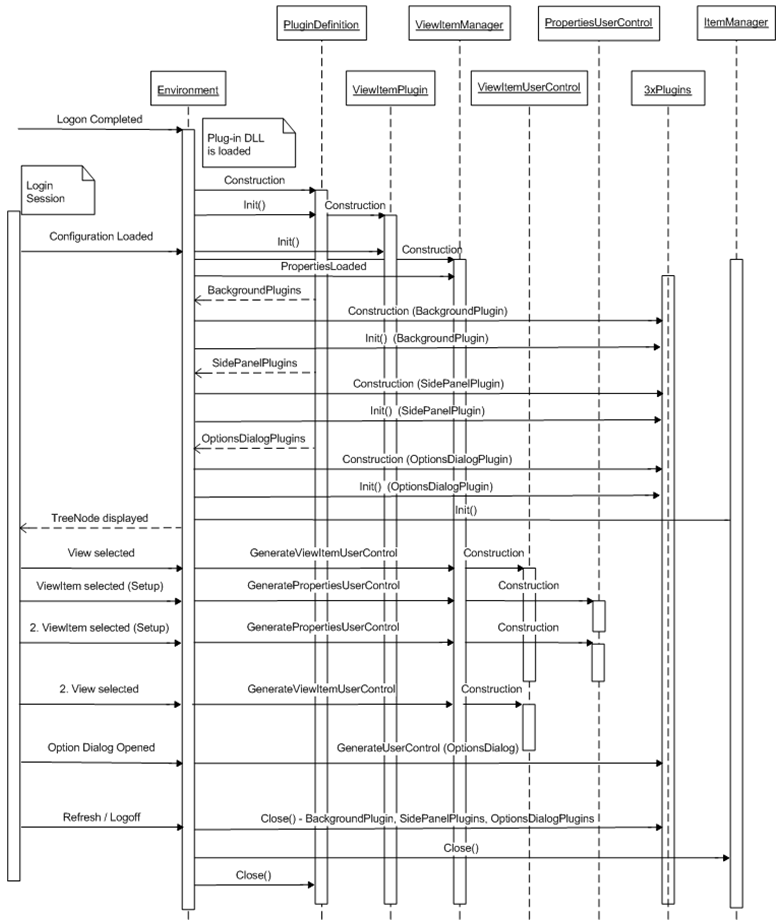
The life cycles of classes in the Smart Client are illustrated below. Almost all plug-ins are constructed and initialized during the login process.
The ViewItemUserControls and the PropertiesUserControls are generated and disposed as the user selects different views or selects different viewitems in one view during setup mode. Note that one ViewItemManager holds the configuration for a viewitem position.
If multiple floating windows are opened with the same view, there is still only one ViewItemManager, but multiple ViewItemUserControls. The refresh process is not illustrated below, but it basically callis the Close() on all plug-ins, and Init() again after the new configuration is in place.