Matrix Wall notification
You want to add notifications and display video based on events generated by Milestone. You can use the matrix command feature in the Milestone VMS to push notification to a matrix server without delay. You can do this when you must react immediately on a given event. The matrix command contains a reference to a camera. The sender of the matrix command can for example be a MIP plug-in that runs in the XProtect Event Server and that lets the VMS system forward the command to the destination that the end-user has defined.
Prerequisites
You have your own application and want to receive notifications on particular video events.
Proposed Solution
Implement a VMS Matrix server service in the current partner developed application to receive matrix events and start showing live video.
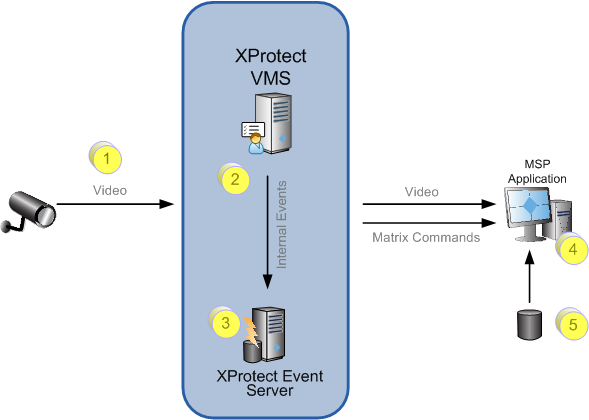
Cameras (1)
- Live video that comes from the associated cameras.
VMS (2)
- Configure rules to trigger designated commands or alarms.
Partner developed plugin (3)
- A partner developed plugin that runs within the Event Server digests the events, alarms, and other actions and uses it to create and issue Matrix commands.
Existing partner developed client application (4)
- The application listens for matrix commands that come from the VMS system, and handles the commands as appropriate. It can for example start showing live video. MIP components can be used to display the video. Some configuration development on the matrix-server may be required for the partner developed client application.
External database (5)
- An external database contains the relevant information to be displayed together with the live video.