Access Control Overview
Introduction to plug-in developed classes
The following sections will use code snippets from the sample DemoAccessControlPlugin, which is part of the MIP Plug-in solution. It may be useful to open that project while reading along.
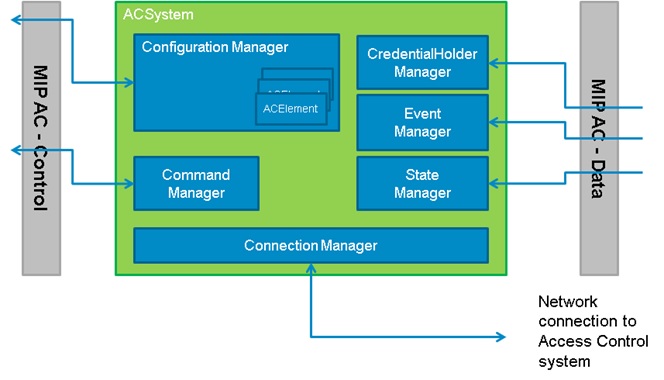
All ACxxxxPlugin and ACxxxxManager classes need to be implemented by the AC plug-in. Currently there are 2 plug-in classes and 6 manager classes.
ACPluginDefinition
A simple class containing the DLL’s id, name, version and a list of specific ACPlugins. Multiple plug-ins can be compiled into one dll, as this can be useful when some access control systems exist in different generations with some parts being common but other needs to be specific.
ACPlugin
The ACPlugin class contains the definition for a specific access control plug-in:
- Specific event categories
- Specific icons
- Configuration parameters and validation of these
You can define any set of parameters however Milestone suggest that it is kept to a small number, for example less than 10.
Example:
    new ACPropertyDefinition("ACAddress", "Address","localhost",
            0,false,
            "The address of the Demo server",ACValueTypes.StringType,
            null),
    new ACPropertyDefinition("ACPort","Port","8732",
            0,false,
            "The port of the Demo server",ACValueTypes.IntType,
            new ACProperty[] {
                  new ACProperty(ACValueTypeProperties.IntTypeMinValue, "1"),
                  new  ACProperty(ACValueTypeProperties.IntTypeMaxValue, "65535")
            }),
This will be shown to administrator like this:
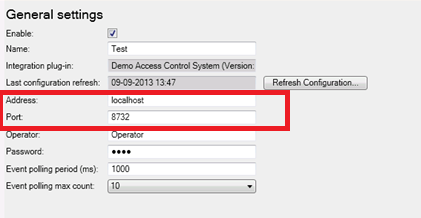
The red area shows how the two properties above are displayed.
ACSystem
The ACSystem is the main class which contains configuration and references to the plug-in implementation of all the managers. This class is constructed by the MIP AC layer for each server added by the administrator.
When the Init method is called the ACAlarmRepository property has been initialized and can be passed on to a separate class that will be handling alarm syncronization (if applicable).
The class is used by XProtect ACM to initialize a stored configuration and hold all classes relevant for one server.
ACCommandManager
ACCommandManager handles sending commands from XProtect Smart Client or rule engine to the access control system.
The class has two simple methods to be implemented, one that just fires the command, and another that includes credential information relevant for the access control system. The later assists in providing a correct authorization check and audit trail on the access control system.
When trigger commands to the access control system, let the access control system provide state and event changes to the system, rather than interpreting it in the ACCommandManager. E.g. a “Door-Open” command should not automatically fire a “Door-opening” event - but wait for the change to actually happen and a new event is received.
ACConfigurationManager
The ACConfigurationManager provides the entire configuration for one access control system. This includes all type definitions as well as all instances.
The configuration manager reacts on commands coming from the XProtect ACM and sends back progress and change events.
When the administrator adds a new system, the ACConfigurationManager will be asked to begin getting the configuration. The ACConfigurationManager should start this in another thread and provide progress information on a regular basis, so the administrator can follow the progress.
This class uses a set of “Firexxx” methods implemented in the base class to notify about progress and error conditions.
When a new configuration is fetched, this class should not apply the configuration right away! Instead, it should forward it via the “FireFetchxxx” methods, and then let the administrator accept the new configuration or discard the new configuration.
When the administrator accepts a new configuration, the “ApplyConfiguration” method is called and the ACConfigurationManager can then use it.
When using personalized login, each person logging in may have a different set of configuration. When a XProtect Smart Client user is logging on, the user will also be asked to log on to the access control system – and the MIP-AC will together with the ACConfigurationManager hold a specific configuration for that user. All logon and getting the configuration is carried out by the ACConfigurationManager; the XProtect Smart Client does not contact any access control system directly.
ACConnectionManager
The MIP-AC will call the ACConnectionManager to control when to connect or disconnect to an access control system. Typically the configuration has been applied first in the ACConfigurationManager, and this class is called with the “Connect()” method to start receiving new events and state changes.
This class is also used when supporting personalized login for credential check.
From an implementation point of view, the ACConectionManager must work with the ACEventManager and ACStateManager to fire event and state related to the ACSystem itself – e.g. “System Up”/”System Down” events or similar, as well as call the “FireACSystemConnectionStateChanged” to assist the administrator and operator to monitor connection state.
When a connection is established, the ACEventManager and ACStateManager should start operating.
ACEventManager
The ACEventManager class forwards events from an access control system to the MIP-AC.
This is done by calling the “FireEventsOccurred” on the base class. Consider to combine many new events into one call when possible.
The execution of the communication to the access control system must be done on a specific thread for the plug-in, to allow state changes etc to be updated while commands are executed.
From an implementation point of view, there may be one thread that ACConnectionManager, ACEventManager and ACStateManager is working with.
The events being fired, must be defined in the ACEventType with “EventTypeId” matching an “Id”.
The ACSystem element representing the access control (and the connection to it), needs a bit of code to generate events for when a connection is established and disconnected to the system as a whole. These events will of cause not come from the access control system itself, but will need to be generated in this class.
ACStateManager
The ACStateManager assist the MIP-AC with getting hold of current state of an ACOperationalType element (e.g. ACSystem or ACUnit), and provides continous updates of state changes.
The MIP-AC will consider all ACOperationalType elements to be in an unknown state, until the ACStateManager has provided a specific state.
State is shown on maps, in the Management Client, and several places in the XProtect Smart Client.
A given ACUnit can have several states, but only one icon at a given time. The ACStateManager needs to identify the best icon to represent the combination of current states.
ACCredentialHolderManager
The ACCredentialHolderManager pass on cardholder information from the access control system to MIP-AC.
Note that both the XProtect Smart Client and the Event Server have in memory caching of cardholder information.
To make it clear how the process around cardholder information is:
1. XProtect Smart Client receives an event with cardholder ID and wants to display cardholder info
2. Smart Client looks up in internal in-memory cache (by default 1000 entries, time-out on entries 1 hour)
3. If not available in Smart Client cache the Event Server is asked
4. Event Server looks up in internal in-memory cache (by default 1000 entries, time-out on entries 1 hour)
5. If not available in Event Server cache the Event Server will ask the plug-in
6. The GetCredentialHolder method on the CredentialHolderManager in the plug-in is called and should retrieve new information from the Access Control system server
7. If not available “null” is returned – this is cached for 5 minutes before retrying
Caches may by updated by the plug-in by calling the FireCredentialHoldersChanged method with updated information. This will be propagated all the way to the XProtect Smart Client. The Management Client does not have an internal card holder cache and will always ask the Event Server. The intended approach by the AC plug-in is to retrieve cardholder information when called on the GetCredentialHolder method and not worry about caching. Card holder information is not consider a part of the configuration and would not typically be retrieved when adding an integration (“Create new…”) in management app/client. If possible when card holder information is changed (e.g. if name is changed on the Access Control system) this should be detected by the plug-in and the FireCredentialHoldersChanged method should be called with updated information.